
External BIOS Update (AN07): Difference between revisions
Samuelguth (talk | contribs) Created page with "{| class="wikitable" |+ !Affected Products !x86-based products |} ==Preface== This application note describes how to proceed if the congatec Embedded BIOS needs to be updated from a SPI flash device when the image on the internal flash is corrupt and no longer functioning. ===Terminology=== {| class="wikitable" |'''Term''' |'''Description''' |- |UEFI |Unified Extensible Firmware Interface |- |AMI |American Megatrends, Inc - congatec’s BIOS partner |- |Aptio |AMIs U..." |
Samuelguth (talk | contribs) |
||
| Line 98: | Line 98: | ||
- Check the module's user’s guide for the BIOS binary size, operating voltage and additional parameters like SFDP. | - Check the module's user’s guide for the BIOS binary size, operating voltage and additional parameters like SFDP. | ||
| Line 140: | Line 141: | ||
The flash devices have a SOIC8 or SOIC16 footprint and need the corresponding adapter. | The flash devices have a SOIC8 or SOIC16 footprint and need the corresponding adapter. | ||
| Line 145: | Line 147: | ||
<span style="color: red;">'''''There are different voltages for different products. Applying 3.3V to a 1.8V SPI flash will destroy the chip. The SPI interface on the conga-SEVAL runs at 1.8V, while other evaluation carriers and the MITX debug card run at 3.3V. '''''</span> | <span style="color: red;">'''''There are different voltages for different products. Applying 3.3V to a 1.8V SPI flash will destroy the chip. The SPI interface on the conga-SEVAL runs at 1.8V, while other evaluation carriers and the MITX debug card run at 3.3V. '''''</span> | ||
| Line 150: | Line 153: | ||
After making sure you got the right programmer and adapter for the SPI flash device, program the BIOS binary onto the SPI flash. | After making sure you got the right programmer and adapter for the SPI flash device, program the BIOS binary onto the SPI flash. | ||
| Line 166: | Line 170: | ||
# Start the system and boot into the operating system on the USB stick. | # Start the system and boot into the operating system on the USB stick. | ||
# Navigate to the folder where cgutlcmd | # Navigate to the folder where cgutlcmd | ||
| Line 175: | Line 180: | ||
cgutlcmd bflash /eu | cgutlcmd bflash /eu | ||
If the flash part needs to be unlocked, the system will perform a power cycle in order to unlock it. This is necessary to do a full update in the next step. A full update means that not only the UEFI firmware content will be flashed to the flash part but also any additional firmware that is required (for example ME and TXE binaries). | If the flash part needs to be unlocked, the system will perform a power cycle in order to unlock it. This is necessary to do a full update in the next step. A full update means that not only the UEFI firmware content will be flashed to the flash part but also any additional firmware that is required (for example ME and TXE binaries). | ||
Revision as of 06:34, 7 August 2024
| Affected Products | x86-based products |
|---|
Preface
This application note describes how to proceed if the congatec Embedded BIOS needs to be updated from a SPI flash device when the image on the internal flash is corrupt and no longer functioning.
Terminology
| Term | Description |
| UEFI | Unified Extensible Firmware Interface |
| AMI | American Megatrends, Inc - congatec’s BIOS partner |
| Aptio | AMIs UEFI Firmware product |
| COM | Computer on Module |
| SBC | Single board computer |
Introduction
congatec embedded computer modules and single board computers use congatec embedded BIOS stored in an onboard SPI flash device. It is based on AMIs Aptio UEFI firmware solution.
This application note describes how to update a congatec BIOS from the external SPI flash located on the evaluation carrier board for the respective module or on the debug adapter for SBCs.
Updating from an external flash device may be necessary if the BIOS on the onboard flash is corrupt and no longer bootable.
The conga-TS170 and the BIOS binary file BQSLR011.bin is used as an example.
Required Equipment
The following equipment is required to perform a BIOS update from an external flash device.
Equipment for Modules Only
- congatec evaluation carrier board
- conga-TEVAL or TEVAL/COMe 3.0 for COM Express type 6 modules
- conga-X7/EVAL for COM Express type 7 modules
- conga-MEVAL for COM Express type 10 modules
- conga-QEVAL/Qseven 2.0 for Qseven modules
- conga-SEVAL for SMARC modules
- conga-HPC/EVAL-Server for COM-HPC Server modules
- conga-HPC/EVAL-Client for COM-HPC Client modules
- congatec CPU module
Equipment for Single Board Computers Only
- conga-MITX/debug card (PN047858)
- congatec MINI-ITX SBC
Additional Equipment
- Power Supply
- USB Keyboard
- Display
- SPI flash device with the current BIOS preprogrammed (see section 4 for instruction on how to preprogramm an external BIOS flash device)
- Examples of supported SPI flashes are:
- SOIC8 package
o Macronix MX25L25645GM2I for 256Mbit (32MByte) 3.3V
o Winbond W25Q128FV for 128Mbit (16MByte) 3.3V
o Winbond W25Q64CV for 64Mbit (8MByte) 3.3V
o Winbond W25Q32BV for 32Mbit (4MByte) 3.3V
o Winbond W25Q64FWSSIQ for 64Mbit (8MByte) 1.8V
- SOIC16 package
o MX25L25645GMI-08G
o MX25L51245GMI-08G
o W25Q256JVFQ
o W25Q512JVFQ
- Check the module's user’s guide for the BIOS binary size, operating voltage and additional parameters like SFDP.
Note:
The external BIOS flash chip must be the same size as the BIOS .bin file. An external flash chip larger than the BIOS file size might not work
- Bootable DOS or UEFi shell USB memory stick (refer to section 3)
- BIOS binary file (contact the congatec technical support or visit the restricted area on the congatec web page to get the latest BIOS revision for the CPU product you are using.)
- Congatec System Utility, avaiable for download at www.congatec.com
- cgutlcmd.exe (DOS command line version)
- cgutlcmd.efi (UEFI shell command line version)
Creating a Bootable USB Stick
Creating a Bootable FreeDOS USB Stick
- Download Rufus from http://rufus.akeo.ie/
- Insert the USB stick
- Launch and set up Rufus as shown in the screenshot below:
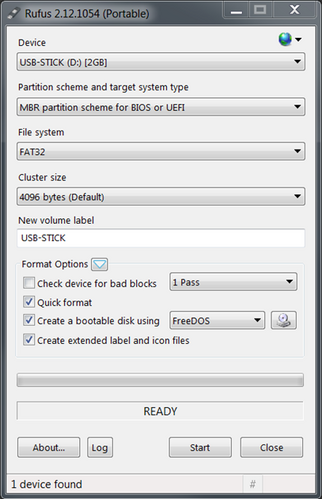
- Click Start.
- Download the latest version of the congatec system utility (cgutil.zip) from www.congatec.com
- Copy the DOS command line version of the congatec system utility (cgutlcmd.exe) from cgutil.zip to the root directory of this FreeDOS USB stick.
- Copy the desired BIOS binary file (*.bin file) for your product to the root directory of this FreeDOS USB stick
.png)
Creating a Bootable UEFI Shell USB Stick
Refer to AN31_Creating_an_UEFI_Stick on how to create a bootable UEFI shell stick.
After the UEFI shell stick is ready:
- Download the latest version of the congatec system utility (cgutil.zip) from www.congatec.com
- Copy the expanded UEFI shell command line version of the congatec system utility (cgutlcmd.efi) from cgutil.zip to the \efi directory of this UEFI shell USB stick.
- Copy the desired BIOS binary file (*.bin file) for your product to the \efi directory of this UEFI shell USB stick.
Pre-Programming the SPI Flash Device
There are two ways for pre-programming the external SPI flash device.
Programming with a Flash Programmer
This is a general overview of the key points you need to be aware of when programming the SPI flash with a flash programmer.
The flash devices have a SOIC8 or SOIC16 footprint and need the corresponding adapter.
Caution:
There are different voltages for different products. Applying 3.3V to a 1.8V SPI flash will destroy the chip. The SPI interface on the conga-SEVAL runs at 1.8V, while other evaluation carriers and the MITX debug card run at 3.3V.
Refer to section 2.3 “Additional Equipment” for the required SPI flash device and the correct BIOS binary file.
After making sure you got the right programmer and adapter for the SPI flash device, program the BIOS binary onto the SPI flash.
Note:
Check the flash size of your product in the respective user’s guide. For products with a ≥32MByte flash device, set the flash programmer to 4-Byte address mode.
If you do not have a flash programmer, use the update procedure described in the following section.
Programming of External BIOS Flash with CGUTIL
In this step, a functioning product of the same type and with the same BIOS flash size is used together with the evaluation carrier/MITX debug card to pre-program the external SPI flash device. The procedure is similar to the actual flash update you will see in chapter 5 “Onboard BIOS Flash Update Procedure”. We recommend a product with the same part number to program the external flash. This way, it is not possible to accidently program the wrong BIOS onto the working board.
- Connect the necessary peripherals and power supply to the system (evaluation carrier + working module or working Mini-ITX board + debug card).
- Insert the empty SPI flash into the socket and set the DIP switches to boot from on-module BIOS. Please refer to chapter 6 for the exact position.
- Plug in the USB boot medium with FreeDos or UEFI shell containing the BIOS flash tool cgutlcmd and the BIOS binary file. Both files should be in the same directory.
- Start the system and boot into the operating system on the USB stick.
- Navigate to the folder where cgutlcmd
Note:
When using the UEFI shell to navigate to the files, you need to select the right file system first. To do this, enter "FSx:", when x stands for the number of the file system, the shell gave to the USB stick.
6. Unlock the flash part by entering the following command:
cgutlcmd bflash /eu
If the flash part needs to be unlocked, the system will perform a power cycle in order to unlock it. This is necessary to do a full update in the next step. A full update means that not only the UEFI firmware content will be flashed to the flash part but also any additional firmware that is required (for example ME and TXE binaries).