
Secure Boot BIOS Customization (AN39): Difference between revisions
Piotrkorsak (talk | contribs) mNo edit summary |
Piotrkorsak (talk | contribs) mNo edit summary |
||
| Line 55: | Line 55: | ||
The dbx variable is kept up to date by congatec by replacing this database with the latest UEFI Revocation list from https://uefi.org/revocationlistfile every time a new BIOS is released. | The dbx variable is kept up to date by congatec by replacing this database with the latest UEFI Revocation list from https://uefi.org/revocationlistfile every time a new BIOS is released. | ||
The Platform Key is a self-signed root key and consists of a public and private key. Only the public part of the key (PK<sub>pub</sub> | The Platform Key is a self-signed root key and consists of a public and private key. Only the public part of the key (PK<sub>pub</sub>) is required for the customized BIOS. The private part of the key (PK<sub>priv</sub>) must remain with the customer at a secure location. | ||
Caution: | |||
A KEK is used to sign the db and dbx signature databases. By default, a KEK variable contains two Microsoft keys. See | Never expose PKpriv to the public. PKpriv is only used to sign the KEK variable. | ||
A KEK is used to sign the db and dbx signature databases. By default, a KEK variable contains two Microsoft keys. See section [[Secure Boot Setup Support]] below for more information. | |||
The UEFI specification defines two additional signature databases not commonly used and also not required and therefore not covered in this document: | The UEFI specification defines two additional signature databases not commonly used and also not required and therefore not covered in this document: | ||
| Line 71: | Line 74: | ||
*'''RSA-2048 Key''' with a fixed certificate size of 2048 bits | *'''RSA-2048 Key''' with a fixed certificate size of 2048 bits | ||
*'''SHA256 Hash''' with a fixed | *'''SHA256 Hash''' with a fixed certificate size of 32 bytes | ||
*'''X509 Certificate''' with a typical size of >1kb | *'''X509 Certificate''' with a typical size of >1kb | ||
| Line 82: | Line 85: | ||
congatec supports the common X509 key certificate in its Embedded BIOS solution. Customers requesting a BIOS with Secure Boot support need to provide their OEM specific keys as | congatec supports the common X509 key certificate in its Embedded BIOS solution. Customers requesting a BIOS with Secure Boot support need to provide their OEM specific keys as <code>x509 ASN.1 DER</code> files (usually ending in <code>.cer</code>). | ||
A key file in PEM format needs to be converted to DER-for example by using the command line OpenSSL: | A key file in PEM format needs to be converted to DER - for example by using the command line OpenSSL: | ||
<code>openssl x509 -outform der -in OEM_PK.pem -out OEM_PK.der</code> | <code>openssl x509 -outform der -in OEM_PK.pem -out OEM_PK.der</code> | ||
| Line 91: | Line 94: | ||
OEMs have two options to provision their specific keys: | OEMs have two options to provision their specific keys: | ||
*User initiated from BIOS setup program (time consuming, only suitable for low volume products.) See | *User initiated from BIOS setup program (time consuming, only suitable for low volume products.) See section [[Secure Boot Setup Support]] for more information. | ||
*Customized BIOS with built-in (factory) OEM keys (for high volume products). See | *Customized BIOS with built-in (factory) OEM keys (for high volume products). See section [[congatec Secure Boot BIOS Customization]] for more information. | ||
==Secure Boot Setup Support== | ==Secure Boot Setup Support== | ||
The congatec Embedded BIOS allows to configure a system for Secure Boot in BIOS setup. You can find the Secure Boot submenu under the Security tab. | The congatec Embedded BIOS allows to configure a system for Secure Boot in BIOS setup. You can find the "Secure Boot" submenu under the "Security tab". | ||
::[[File:Secure Boot BIOS Customization (001).png|none|thumb|Figure 1: Secure Boot Setup Menu|452x452px]] | ::[[File:Secure Boot BIOS Customization (001).png|none|thumb|Figure 1: Secure Boot Setup Menu|452x452px]] | ||
Before Secure Boot can be enabled, the OEM keys must be added to the BIOS and the '''Secure Boot Mode''' must be set to '''Custom'''. Use the '''>Key Management''' sub menu to add your specific keys, especially the PK and KEK signed with your PK. | Before Secure Boot can be enabled, the OEM keys must be added to the BIOS and the '''Secure Boot Mode''' must be set to '''Custom'''. Use the '''>Key Management''' sub menu to add your specific keys, especially the PK and KEK signed with your PK. | ||
| Line 113: | Line 116: | ||
==congatec Secure Boot BIOS Customization== | ==congatec Secure Boot BIOS Customization== | ||
congatec developed an OEM Secure Boot support module for quick and easy BIOS customization. OEM keys in X.509 ANS.1 DER Public Key Certificate format can be instantly added to the BIOS build process. Such a full custom (source code) BIOS usually requires the mandatory OEM public PK, KEK and optionally the db keys. | congatec developed an OEM Secure Boot support module for quick and easy BIOS customization. OEM keys in <code>X.509 ANS.1 DER</code> Public Key Certificate format can be instantly added to the BIOS build process. Such a full custom (source code) BIOS usually requires the mandatory OEM public PK, KEK and optionally the db keys. | ||
OEMs have three options for the KEK and db signature databases: | OEMs have three options for the KEK and db signature databases: | ||
# asdfgaf | |||
# dfsaffsaf | |||
#Use the BIOS default keys: | #Use the BIOS default keys: | ||
* MS Windows PCA (public certificate authority) for Microsoft OS | * MS Windows PCA (public certificate authority) for Microsoft OS | ||
* MS UEFI CA for Linux boot loaders and 3rd party EFI drivers | * MS UEFI CA for Linux boot loaders and 3rd party EFI drivers | ||
{{Continue Numbered List|2|Append OEM keys to BIOS default keys:}} | {{Continue Numbered List|2|Append OEM keys to BIOS default keys:}} | ||
| Line 129: | Line 133: | ||
* OEM Key | * OEM Key | ||
{{Continue Numbered List|3|Use only OEM keys and remove MS keys | {{Continue Numbered List|3|Use only OEM keys and remove MS keys - only starts OEM signed boot loaders and executables. MS Windows and standard Linux boot loaders are not started in this configuration.}} | ||
'''''<br />Note:''''' | '''''<br />Note:''''' | ||
'''''Always protect the BIOS setup with a password to prevent non-authorized users from changing the system configuration (e.g. from disabling Secure Boot).''''' | * '''''Always protect the BIOS setup with a password to prevent non-authorized users from changing the system configuration (e.g. from disabling Secure Boot).''''' | ||
* '''''With such a Secure Boot enabled OEM BIOS, the system can only boot certain operating systems/boot loaders. Older operating systems (e.g. MS-DOS, Windows 7) and unsigned Linux bootloaders, as well as the UEFI shell, cannot be used anymore. This can limit options for system diagnostics and debugging.''''' | |||
'''''With such a Secure Boot enabled OEM BIOS, the system can only boot certain operating systems/boot loaders. Older operating systems (e.g. MS-DOS, Windows 7) and unsigned Linux bootloaders as well as the UEFI shell cannot be used anymore. This can limit options for system diagnostics and debugging.''''' | * '''''For more information about congatec’s Secure Boot customization, contact congatec technical support at [mailto:support@congatec.com support@congatec.com]''''' | ||
'''''For more information about congatec’s Secure Boot customization, contact congatec technical support at [mailto:support@congatec.com support@congatec.com]''''' | |||
== Key Generation and Driver Signing== | == Key Generation and Driver Signing== | ||
The most common tools for OEM key generation and driver signings are: | The most common tools for OEM key generation and driver signings are: | ||
*'''signtooL.exe''' (Windows) | *'''<code>signtooL.exe</code>''' (Windows) | ||
*'''MakeCert.exe''' (Windows) | *'''<code>MakeCert.exe</code>''' (Windows) | ||
*'''OpenSSL''' (Windows, Linux) | *'''OpenSSL''' (Windows, Linux) | ||
Revision as of 12:40, 4 October 2024
| Affected Products | Products featuring firmware supporting the UEFI Secure Boot feature |
|---|
Preface
This Application Note explains the OEM specific customizations required to deploy a Secure Boot enabled BIOS. Although all latest congatec embedded BIOS releases offer Secure Boot support, it is still necessary to customize the BIOS with the OEMs Secure Boot keys, especially the Platform key (PK).
Terminology
| Term | Description |
|---|---|
| BIOS | Basic Input Output System |
| UEFI | Unified Extensible Firmware Interface |
| CSM | Compatibility Support Module |
| RSA | Asymmetric public key cryptosystem named after their inventors Rivest, Shamir and Adleman |
| SHA | Secure Hash Algorithm |
Secure Boot Introduction
Secure boot is a security standard to ensure that a PC boots using only software trusted by the Original Equipment Manufacturer (OEM). It was developed to prevent any unauthorized software from loading in the pre-boot space.
When the PC starts, the firmware checks the signature of each piece of boot software, including UEFI firmware drivers (also known as Option ROMs), EFI applications, and the operating system. If the signatures are valid, the PC boots, and the firmware gives control to the operating system bootloader.
Secure Boot ensures that only properly signed and verified boot loaders and EFI drivers are executed. Secure Boot was introduced in the UEFI specification version 2.3.1. The current UEFI specification can be downloaded from www.uefi.org
Secure Boot Requirements
Two requirements must be met in order to enable Secure Boot:
- CSM must be disabled
- Platform Key (PK) variable must be installed
Caution:
The pre-installed default PK (from the BIOS vendor American Megatrends Inc.) MUST NOT be used to deploy Secure Boot.
Secure Boot Variables
There are two keys and two signature databases that play an important role for the Secure Boot mechanism:
- Platform Key (PK): establishes trust relationship between platform owner (OEM) and platform firmware (BIOS)
- Key Exchange Key (KEK): establishes trust relationship between OS (e.g. MS Windows) and platform firmware (BIOS)
- db (Good Signature Database = White List)
- dbx (Revocation Signature Database = Black List)
In a customized BIOS with Secure Boot support enabled, the PK, KEK and db (optional) variables are typically provided by the customer as OEM certificates.
The dbx variable is kept up to date by congatec by replacing this database with the latest UEFI Revocation list from https://uefi.org/revocationlistfile every time a new BIOS is released.
The Platform Key is a self-signed root key and consists of a public and private key. Only the public part of the key (PKpub) is required for the customized BIOS. The private part of the key (PKpriv) must remain with the customer at a secure location.
Caution:
Never expose PKpriv to the public. PKpriv is only used to sign the KEK variable.
A KEK is used to sign the db and dbx signature databases. By default, a KEK variable contains two Microsoft keys. See section Secure Boot Setup Support below for more information.
The UEFI specification defines two additional signature databases not commonly used and also not required and therefore not covered in this document:
- dbt (time stamp signature database)
- dbr (recovery signature database)
Key Formats
Secure Boot support the following three key formats:
- RSA-2048 Key with a fixed certificate size of 2048 bits
- SHA256 Hash with a fixed certificate size of 32 bytes
- X509 Certificate with a typical size of >1kb
A X509 certificate contains information about a key, including:
- name of the issuer
- validity time frame
- relationship to the trusted root certificate key
- digital signature of the key made with the root key
congatec supports the common X509 key certificate in its Embedded BIOS solution. Customers requesting a BIOS with Secure Boot support need to provide their OEM specific keys as x509 ASN.1 DER files (usually ending in .cer).
A key file in PEM format needs to be converted to DER - for example by using the command line OpenSSL:
openssl x509 -outform der -in OEM_PK.pem -out OEM_PK.der
Key Provisioning
OEMs have two options to provision their specific keys:
- User initiated from BIOS setup program (time consuming, only suitable for low volume products.) See section Secure Boot Setup Support for more information.
- Customized BIOS with built-in (factory) OEM keys (for high volume products). See section congatec Secure Boot BIOS Customization for more information.
Secure Boot Setup Support
The congatec Embedded BIOS allows to configure a system for Secure Boot in BIOS setup. You can find the "Secure Boot" submenu under the "Security tab".
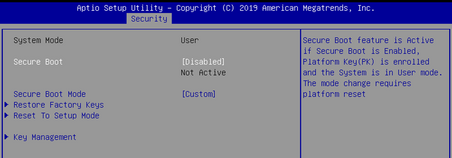
Figure 1: Secure Boot Setup Menu
.png)
Before Secure Boot can be enabled, the OEM keys must be added to the BIOS and the Secure Boot Mode must be set to Custom. Use the >Key Management sub menu to add your specific keys, especially the PK and KEK signed with your PK.
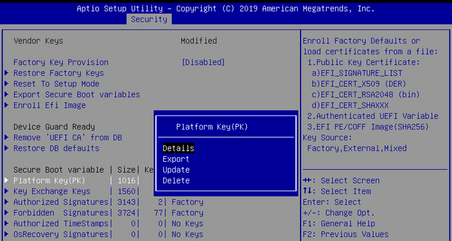
Figure 2: Key Management Support
.png)
When the Secure Boot variables are configured for the first time, the Secure Boot is in setup mode. This means that the keys are not installed (as shown in Figure 3 below).
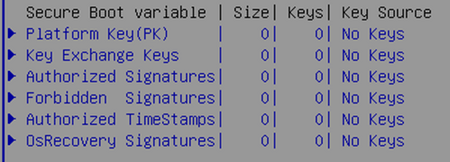
Figure 3: In Setup Mode all keys are removed
.png)
The preferred way to customize the keys in BIOS setup is to first load the built-in default keys. This can be achieved with the setup node >Restore Factory Keys. The main purpose is to load valid db and dbx signature databases. The factory PK and KEK must be overwritten with your OEM keys. The Test (AMI) PK is only for Secure Boot testing and must not be deployed to the field!
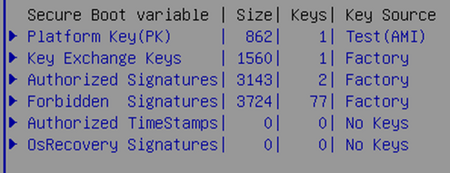
Figure 4: Factory Keys loaded
.png)
The key management setup support offers several options to customize the secure boot variables (see Figure 2). Use the Update option to replace the factory PK and KEK with your OEM specific keys loaded from a file system (e.g. on a USB stick). Then update the Secure Boot variables. An example is shown in Figure 5 below. PK and KEK were loaded from external storage and the built-in signature databases (db and dbx) are used. You can also replace the factory signature databases with your OEM specific ones.
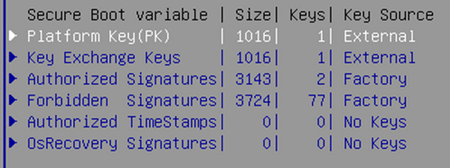
Figure 5 Customized Secure Boot variables
.png)
Now that the Secure Boot keys are installed, Secure Boot can be enabled under the Security tab. After a platform reset, the system is in Secure Boot mode.
Note:
Always protect the BIOS setup with a password to prevent non-authorized users from changing the system configuration (disabling Secure Boot).
congatec Secure Boot BIOS Customization
congatec developed an OEM Secure Boot support module for quick and easy BIOS customization. OEM keys in X.509 ANS.1 DER Public Key Certificate format can be instantly added to the BIOS build process. Such a full custom (source code) BIOS usually requires the mandatory OEM public PK, KEK and optionally the db keys.
OEMs have three options for the KEK and db signature databases:
- asdfgaf
- dfsaffsaf
- Use the BIOS default keys:
- MS Windows PCA (public certificate authority) for Microsoft OS
- MS UEFI CA for Linux boot loaders and 3rd party EFI drivers
- Append OEM keys to BIOS default keys:
- MS Windows PCA
- MS UEFI CA
- OEM Key
- Use only OEM keys and remove MS keys - only starts OEM signed boot loaders and executables. MS Windows and standard Linux boot loaders are not started in this configuration.
Note:
- Always protect the BIOS setup with a password to prevent non-authorized users from changing the system configuration (e.g. from disabling Secure Boot).
- With such a Secure Boot enabled OEM BIOS, the system can only boot certain operating systems/boot loaders. Older operating systems (e.g. MS-DOS, Windows 7) and unsigned Linux bootloaders, as well as the UEFI shell, cannot be used anymore. This can limit options for system diagnostics and debugging.
- For more information about congatec’s Secure Boot customization, contact congatec technical support at support@congatec.com
Key Generation and Driver Signing
The most common tools for OEM key generation and driver signings are:
signtooL.exe(Windows)MakeCert.exe(Windows)- OpenSSL (Windows, Linux)
The usage of these tools is beyond the scope of this Application Note. Please refer to available literature for a detailed description how to run these tools to sign drivers and generate key certificates.
Useful links:
- OpenSSL: https://www.openssl.org